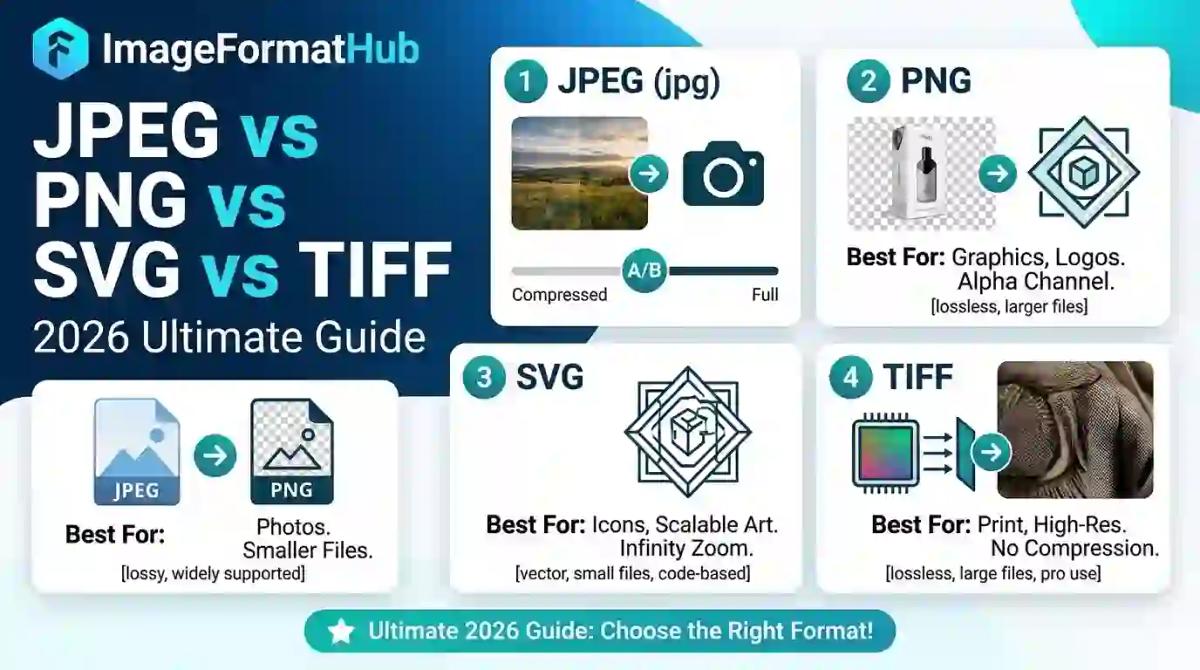
JPEG vs PNG vs SVG vs TIFF: Best Image Format Guide (2026)
You spend an hour perfecting a product photo, upload it to your online store, and it looks blurry, pixelated, or oddly compressed the moment it goes live. Nine times out of ten, the problem isn't your camera or your editing skills — it's the image format you chose.
Most people never think about file formats until something breaks. A logo looks fuzzy on a website. A printed flyer comes out grainy. A transparent background suddenly has a white box around it. These aren't random glitches — they're the direct result of using the wrong format for the job.
This guide breaks down exactly what JPEG, PNG, SVG, and TIFF actually are, how they differ, and which one you should use depending on what you're creating — whether that's a product photo, a logo, a printed poster, or a passport photo. By the end, you'll know exactly which format fits your project, and you'll never have to guess again.
What Is an Image File Format, and Why Does It Actually Matter?
An image file format is simply the way visual data is stored, compressed, and read by your computer, browser, or printer. Different formats store color, transparency, and detail in different ways — and that difference decides how sharp, small, editable, or print-ready your final image will be.
Think of it like packing for a trip. You could stuff everything into one giant suitcase (a large, uncompressed file), or you could pack smart and compress things without losing what matters (a well-chosen format). Choose wrong, and you either waste space or damage what's inside.
Format choice affects four practical things:
- File size — how fast your page loads or how much storage you use
- Image quality — how sharp or blurry the final result looks
- Transparency support — whether backgrounds can be see-through
- Scalability — whether the image stays crisp when resized
Getting this right isn't just a technical detail — it directly affects your website's speed, your print quality, and how professional your visuals look. According to Google's web performance documentation, image format choice is one of the biggest factors in page load speed, which in turn affects search rankings and user experience.
What Is JPEG (or JPG) Format?
JPEG — short for Joint Photographic Experts Group — is the most widely used image format in the world, and there's a good reason for that. It's the default format for digital cameras, smartphones, and most photos you see online.
JPEG uses "lossy compression," which means it shrinks file size by discarding some image data that the human eye typically won't notice. The result is a much smaller file that still looks good for everyday use — social media posts, blog images, email attachments, and general photography.
Where JPEG shines:
- Photographs with lots of color gradients (sunsets, skin tones, landscapes)
- Web images where fast loading matters more than pixel-perfect detail
- Situations where file size needs to stay small (email, messaging apps)
Where JPEG struggles:
- It doesn't support transparency — every JPEG has a solid background
- Repeated saving and editing degrades quality over time ("generation loss")
- Sharp edges, text, and logos can look blurry or develop visible artifacts
If you've ever asked "what is JPEG format in photos" or "what is JPEG image format," the short answer is: it's the everyday photo format built for compression and speed, not for perfect precision.
What Is PNG Image Format?
PNG (Portable Network Graphics) was created specifically to fix what JPEG couldn't do — support transparency and preserve quality without degrading each time you save.
PNG uses "lossless compression," meaning no image data is thrown away. Every pixel stays exactly as it was created. This makes PNG the go-to format for anything that needs a transparent background or sharp, clean edges.
Where PNG shines:
- Logos, icons, and graphics with transparent backgrounds
- Screenshots and text-heavy images
- Product photos that need a transparent or removable background
- Any image you plan to edit repeatedly without quality loss
Where PNG struggles:
- File sizes are noticeably larger than JPEG, especially for photos
- Not ideal for large, complex photographs meant for the web
This is exactly why so many people search "what do PNG files offer that JPG files do not" — the answer is transparency and lossless quality, at the cost of a bigger file. If you're preparing product photos for platforms like Amazon or Etsy, PNG (often paired with a transparent background) is usually the smarter choice. Tools like RemoverHub's transparent image maker are built exactly for this — turning any photo into a clean, transparent PNG in seconds.
What Is SVG Image Format?
SVG (Scalable Vector Graphics) is a completely different type of format compared to JPEG and PNG. Instead of storing a grid of pixels, SVG stores mathematical instructions that describe shapes, lines, and curves.
This means an SVG file can be resized to any dimension — from a tiny favicon to a massive billboard — without ever losing sharpness or becoming pixelated. That's what "scalable" means in the name.
Where SVG shines:
- Logos and icons that need to work at multiple sizes
- Illustrations, charts, and diagrams
- Responsive websites where images need to scale on different screen sizes
Where SVG struggles:
- It's not designed for photographs — vector math can't realistically replicate a photo's complexity
- Complex SVG files can sometimes be heavier than expected if they contain too much detail
If you're a designer wondering "how to change an image to vector format," know that this typically requires vector-tracing software (like Adobe Illustrator) rather than a simple format conversion, since it involves converting pixel data into mathematical paths — not just relabeling a file extension.
What Is TIFF Used For?
TIFF (Tagged Image File Format) is the heavyweight of the format world. It's an uncompressed or minimally compressed format that preserves maximum image detail, making it a favorite in professional photography, publishing, and printing industries.
To directly answer "is TIFF a vector format" — no, it isn't. TIFF is a raster (pixel-based) format, just like JPEG and PNG, but it stores far more image data per pixel, resulting in significantly larger files.
Where TIFF shines:
- Professional photography and photo archiving
- Print publishing, magazines, and high-resolution scanning
- Any workflow where maximum detail must be preserved for later editing
Where TIFF struggles:
- Massive file sizes make it impractical for websites or everyday sharing
- Not supported natively by most web browsers
- Overkill for casual photos or social media use
If you've ever asked "what a TIFF file is used for" or "what is TIFF used for," think of it as the archival-quality format professionals use when every pixel of detail matters — think wedding photographers, medical imaging, or fine art scanning.
JPEG vs PNG: Which Is Better for Clarity and Printing?
This is one of the most searched comparisons out there, and the honest answer is: it depends entirely on what you're doing with the image.
| Factor | JPEG | PNG |
|---|---|---|
| Best for | Photos, web images | Logos, transparent images, screenshots |
| Compression | Lossy (some quality lost) | Lossless (no quality lost) |
| Transparency | Not supported | Fully supported |
| File size | Smaller | Larger |
| Editing durability | Degrades with repeated saves | Stays consistent |
| Print suitability | Good for photo prints | Better for graphics, logos, text |
So, is PNG higher quality than JPEG? Technically, yes — PNG preserves every pixel with no compression loss. But that doesn't automatically make it "better" for every situation. A high-resolution JPEG straight from a good camera can look identical to the human eye while taking up a fraction of the storage space.
For printing specifically: if you're printing photographs, a high-quality JPEG (saved at maximum quality, not overly compressed) usually performs just as well as PNG, and most print labs actually prefer JPEG because of smaller file sizes. However, if you're printing something with sharp text, a logo, or a graphic with flat colors, PNG (or better yet, a vector format like SVG) will give you cleaner, crisper edges.
If print quality is your priority and your images look soft or slightly blurry, running them through an image sharpener before printing can noticeably improve clarity — especially for older or lower-resolution photos.
What Is the Best Photo Format for High-Quality Images?
If someone asks "what is the highest quality picture format," the technically correct answer is TIFF or a RAW camera format, since these preserve the most data with the least compression. But "highest quality" isn't always "most practical."
Here's a simple way to decide:
- For web use: PNG (graphics/transparency) or optimized JPEG (photos)
- For print use: High-resolution JPEG or TIFF, depending on the print service's requirements
- For logos and icons: SVG, because it scales perfectly at any size
- For professional archiving: TIFF, because it retains maximum detail for future editing
A popular format that supports millions of colors in photos is JPEG — it supports up to 16.7 million colors (24-bit color depth), which is why it remains the standard for photographic images despite its compression.
How to Change an Image Format (Without Losing Quality)
Converting between formats sounds simple, but doing it correctly matters more than people realize. Here's a practical approach:
Identify your end goal first. Are you optimizing for web speed, print quality, or transparency? This decides your target format.
Avoid repeated conversions. Converting JPEG to PNG and back multiple times can introduce quality issues. Always convert from the highest-quality original you have.
Check resolution before converting. A low-resolution JPEG won't magically become sharper just because you save it as PNG or TIFF.
Use dedicated tools for background and transparency work. If your real goal is a transparent background (not just a format change), a dedicated tool does this far more accurately than a basic converter. RemoverHub's AI background remover automatically detects subjects and produces a clean, transparent PNG in one step — no manual selection needed.
If your image also has visible watermarks, unwanted text, or logos that need to go before you convert or print it, tools like the watermark remover or logo remover can clean things up before you finalize your format.
Practical Scenarios: Which Format Should You Actually Use?
Let's make this concrete with real situations people run into:
You're uploading product photos to an online store.
Use PNG with a transparent or clean white background. Marketplaces like Amazon and Etsy often require pure white or transparent backgrounds, and a tool like the background remover for product photos makes this fast and consistent across large batches.
You're designing a logo for your brand.
Use SVG for anything digital (websites, apps) so it scales perfectly on any screen. Keep a high-resolution PNG version on hand for platforms that don't accept SVG uploads.
You're printing a scanned document or old photograph.
Use TIFF if archival quality matters, or a high-resolution JPEG if file size and convenience matter more. If the scan came out blurry or low-resolution, running it through an AI blur remover first can dramatically improve the final print.
You're preparing a passport or ID photo.
These typically require JPEG format with strict background and resolution rules. A specialized passport photo background remover handles the exact background color and sizing requirements most official forms demand.
You're creating a green-screen video thumbnail or graphic.
Here you'd typically export as PNG for transparency, especially if you've used a green screen remover to isolate your subject.
Why Choose RemoverHub for Image Format and Editing Needs
Understanding the difference between formats is only half the battle — actually producing clean, professional-quality images is the other half. This is where having the right tools matters as much as having the right knowledge.
RemoverHub was built around exactly this need: fast, AI-powered tools that solve real formatting and editing problems without requiring design software or a steep learning curve. Whether you need a transparent PNG in seconds, a sharper image for printing, or a clean background for a professional headshot, the platform focuses on practical, one-click results.
Some of the most useful tools for the scenarios covered in this article include:
- HD background remover — for high-resolution transparent backgrounds without pixelation
- Image sharpener — for fixing soft or blurry images before printing or publishing
- AI object remover — for cleaning up distracting elements before finalizing a photo
- Transparent image maker — for converting any photo into a clean transparent PNG
If you want to go deeper on related topics, the blog covers practical walkthroughs like how to make an image transparent online for free, turning a photo into a transparent PNG, and getting background removal in true HD quality without pixelation.
For anyone specifically working on eCommerce visuals, the guide on Amazon product image requirements pairs well with everything discussed here, since marketplace platforms often have strict, format-specific rules that are easy to miss.
Frequently Asked Questions
Is JPG or PNG better for printing?
For photographs, a high-quality JPEG usually works fine and keeps file sizes manageable. For logos, text, or graphics with flat colors and sharp edges, PNG gives cleaner, crisper results.
Is PNG higher quality than JPEG?
Yes, technically — PNG uses lossless compression, meaning no data is discarded. JPEG uses lossy compression, which slightly reduces quality to save space. In practice, a high-quality JPEG can still look excellent for most everyday uses.
Is TIFF a vector format?
No. TIFF is a raster (pixel-based) format known for extremely high image quality and minimal compression, commonly used in professional printing and photo archiving — but it is not scalable like a true vector format such as SVG.
What format is best for printing?
It depends on content type: high-resolution JPEG or TIFF for photographs, and PNG or vector formats like SVG for logos, text, and graphics with sharp edges.
How do I change an image to a vector format?
You'll need vector-tracing software (like Adobe Illustrator or an online vector converter) since converting a photo to vector involves recreating shapes as mathematical paths, not simply changing the file extension.
What's a popular format that supports millions of colors in photos?
JPEG is the most widely used format for full-color photography, supporting roughly 16.7 million colors through 24-bit color depth.
Final Thoughts: Choosing the Right Format Comes Down to Purpose
There's no single "best" image format — only the best format for what you're trying to achieve. JPEG remains unbeatable for everyday photography and web speed. PNG is the clear winner whenever transparency or lossless quality matters. SVG is essential for anything that needs to scale, like logos and icons. And TIFF remains the professional's choice for archival-quality prints and scans.
The real skill isn't memorizing technical specs — it's recognizing what your image needs to do once it leaves your screen. Is it going on a website? Getting printed? Needing a transparent background? Answer that question first, and the right format becomes obvious.
If you're ready to put this into practice, explore RemoverHub's full toolkit to convert, clean, sharpen, or make any image transparent in just a few clicks — no design experience required.